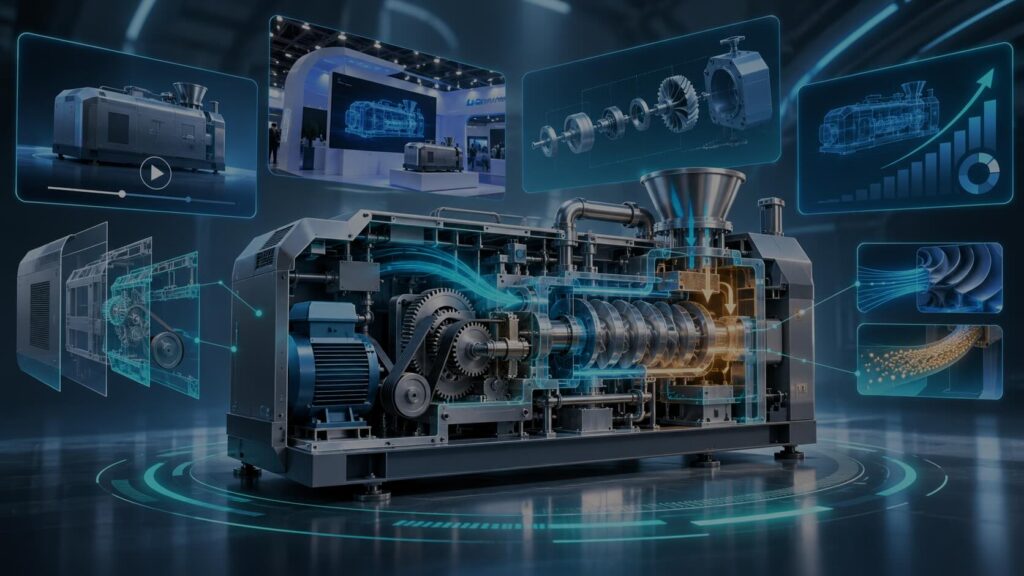

Quick answer: A manufacturing explainer video shows what a machine or process does, how it works inside and why it matters to the buyer. Use cutaways, exploded views or 3D to reveal hidden parts, 2D or motion graphics for processes and ROI, and short cuts for trade shows and training. Lead with the outcome, not the spec sheet.
Why is industrial equipment hard to explain?
You’d think a physical product would be easy to show. Often it isn’t.
- The important part is hidden. The value sits inside a housing, a pipe or a control cabinet. A photo shows the outside.
- It’s big, slow or dangerous. You can’t bring a production line to a sales meeting. Filming one means shutdowns, safety gear and a crew.
- The buyers think differently. Engineers want tolerances and throughput. Plant managers want uptime. Finance wants payback. Operators want to know what changes on Monday.
- Specs don’t sell on their own. A spec sheet tells buyers what a machine is. It rarely shows them what it does for their plant.
Animation fixes most of this. It can see through steel, slow down a process that takes milliseconds, or speed up one that takes a week. Our post on Explainer Videos for Complex Products covers the general scripting method. This one is about what’s different on the factory side.
How do you show what happens inside a machine?
Pick the view that answers the buyer’s real question.
Cutaway. Slice the machine open and show the moving parts in action. Best for “how does it work?”
Exploded view. Pull the assembly apart into its components, then bring it back together. Best for showing build quality, modular design or ease of maintenance.
Process flow. Follow the material: raw input, each stage, finished output. Best for lines, systems and anything where the sequence matters.
Before and after. Show the plant with the problem, then with your product in place. Best for ROI and for non-technical buyers.
Scale shifts. Zoom from the whole facility down to a single seal, sensor or chip. This helps viewers understand where your part fits in a bigger system.
Which animation style fits which industrial message?
| Visual approach | What it’s good at | When it fits | Watch out for |
|---|---|---|---|
| 3D animation | Realistic machinery, materials and mechanics; reusable models | Product launches, hero videos, trade show loops, complex mechanisms | Higher cost and longer timeline; late changes are expensive |
| Cutaway and exploded views (2D or 3D) | Revealing internal parts and assembly | Engineering buyers, maintenance and service content | Needs accurate reference (CAD, drawings) to look right |
| 2D animation | Processes, people, safety and simple mechanics | Training, onboarding, safety, SMB buyers | Can look too simple for precision hardware |
| Motion graphics | Data, dashboards, ROI, IIoT and software layers | Smart-factory software, ERP and MES, sales decks | Must still show the physical product somewhere |
| Mixed media (footage plus animation) | Real plant footage with labels and overlays | When you already have good footage | Old footage can date the video fast |
| AI video (avatar presenter or AI-generated scenes) | Fast, low-cost versions and languages | Internal training updates, multilingual safety briefings | Not for exact mechanical detail; check every frame |
For the full cost and timeline comparison, see 2D vs. 3D Animation for Explainer Videos. If you already have CAD files, mention it early. They can often speed up 3D modeling, though they usually need cleanup before animation.
How technical should a manufacturing video be?
Less than your engineers want and more than your marketers want.
A useful rule: one video, one audience, one job. A homepage video for plant managers should lead with uptime, safety and cost. A video for engineers can show tolerances and flow rates. Trying to serve both in 90 seconds usually serves neither.
A simple structure that works:
- The problem on the plant floor, in one or two sentences.
- Your product, shown in context.
- How it works: one cutaway or process sequence.
- The result for the buyer: less downtime, fewer defects, faster changeovers, safer work.
- A clear next step: request a demo, get a quote, visit the booth.
Have an engineer review the script and the storyboard. Mechanical errors are easy to spot for the people you’re selling to.
Where do manufacturers use explainer videos?
Sales enablement. You can’t ship a machine to every prospect. A 60–120 second explainer travels instead. Reps send it after a call, and champions forward it to finance and operations. Animated product videos also help sales teams explain options and configurations without a site visit. See how video can shorten the B2B sales cycle.
Trade shows. A booth loop has to work with no sound, at a distance, in seconds. Use big visuals, a cutaway hero shot and short on-screen text. A 3D model can also show a product too large to bring to the show floor. Our guide to sound-off explainer videos has more tips.
Training and safety. New hires, operators and service technicians all need consistent instruction. Animated training videos can show lockout steps, assembly sequences and maintenance tasks clearly and the same way every time. They’re also easy to translate for multilingual workforces.
Customer onboarding and service. Show installation, setup and routine maintenance. Clear video can cut down on field service calls and confused support tickets.
Investor and board updates. New plants, new product lines and new technologies are hard to picture from a deck. A short animated piece shows the concept before it’s built.
Recruiting. Modern manufacturing is often invisible to job seekers. A short video can show what the work actually looks like.
How does Gisteo approach manufacturing explainer videos?
We start by learning the machine and the buyer, then write a script that leads with the outcome. Our portfolio includes work for industrial and engineering brands such as Airbus, Castrol, Keysight and Formerra. For physical products we recommend 2D, 2.5D or 3D animation depending on how much realism the message needs. Custom 2D and motion graphics pricing is published: a 60-second explainer costs $3,500 if you bring the script (Just Animate!), $4,000 with our scriptwriting (Full-Service), or $5,000 for 2–3 week delivery (VIP Fast Pass). Each extra 30 seconds is $500. 3D is quoted per project because model complexity varies. For fast multilingual training updates, simple AI avatar videos start at $1,000. Custom projects include unlimited revisions within each stage and a money-back guarantee. See our pricing page for details.
FAQs
Should a manufacturing explainer use 2D or 3D animation?
Use 3D when realism, materials or mechanics are central to the message, such as a new machine launch. Use 2D or motion graphics for processes, software, safety and ROI. Many projects mix the two.
Can you animate our product from CAD files?
Often, yes. CAD and engineering files can speed up 3D modeling. They usually need simplifying and cleanup before they’re ready for animation.
How long should an industrial explainer video be?
60–120 seconds for a product overview. 15–30 seconds for trade show loops and social. Training videos can be longer but work best split into short modules.
Is animation better than filming in our plant?
Animation can show hidden parts, dangerous steps and products that don’t exist yet, with no shutdown or film crew. Live footage builds authenticity. Mixed media combines both.
Can one video work for sales and training?
Rarely as-is. The assets can be reused, though. Build one set of models or illustrations, then cut a sales version and a training version from it.
How long does production take?
At Gisteo, 2D and motion graphics take 3–4 weeks with your script, 5–6 weeks with our scriptwriting, or 2–3 weeks with the VIP Fast Pass. 3D projects usually take longer.