
Introduction
Ask a video agency what style you should use and most will give you the same answer: whatever looks best in our portfolio. That’s not a framework — it’s a sales pitch.
The truth is that animation explainers aren’t one-size-fits-all. A 3D product demo that wows at a hardware launch is overkill for a two-minute onboarding flow. A whiteboard animation that works beautifully in a training context can feel cheap on a premium SaaS landing page. The wrong style choice doesn’t just affect aesthetics — it affects comprehension, engagement, and whether the video actually moves the needle on the goal it was built for.
At Gisteo, we’ve been producing animation explainers since 2011 across thousands of projects — product launches, onboarding flows, internal training, investor pitches, and more. That experience has given us a clear view of which styles work for which jobs, and why. This guide breaks it down in practical terms: a decision framework, a breakdown of the main style families, and concrete guidance on when to use each one.
If you’re planning a video and trying to figure out what kind of animation makes sense, this is the starting point.
Why Animation Explainers Work — When the Style Fits the Job
The case for animation explainers isn’t complicated. Visual storytelling lowers cognitive load. Showing how something works — rather than just describing it — speeds up comprehension and improves retention. A well-structured animated video can communicate a value proposition in 90 seconds that a landing page paragraph takes five minutes to deliver, less effectively.
But that value is conditional on style alignment. Different animation styles carry different cognitive and emotional signals:
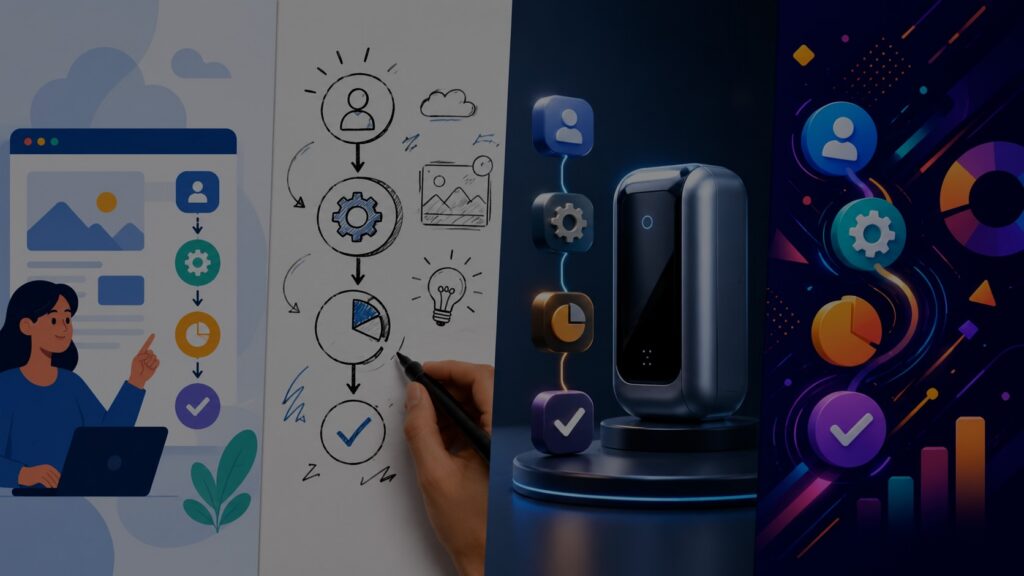
- 2D vector animation reads as clean, modern, and accessible — ideal for software, apps, and process-driven content.
- Whiteboard and sketch styles feel educational and methodical — strong for training, onboarding, and concept-heavy explanations.
- 3D product animation communicates premium quality, depth, and technical sophistication — best for hardware, devices, and feature storytelling where physicality matters.
- Kinetic typography and motion graphics deliver energy, brand voice, and punchy clarity — well-suited for social content, brand campaigns, and short-form storytelling.
Matching the right signal to the right audience in the right context is the whole game. The rest of this guide is about how to make that call confidently.
A Practical Decision Framework for Choosing the Right Animation Style
Before committing to a style, answer four questions. Everything else follows from this.
1. What is the core message and how will you measure success?
Define the single idea the viewer needs to leave with, and the metric that tells you whether the video worked. Conversion rate on a landing page, completion rate in an onboarding flow, support ticket volume after a product rollout — the metric shapes the structure, and the structure shapes the style.
2. Who is the audience and where do they watch?
A B2B buyer evaluating enterprise software on a product page has different needs than a new employee watching onboarding content on mobile. LinkedIn audiences expect short and punchy. YouTube viewers are more tolerant of depth. The platform determines length, pacing, and whether captions are essential — all of which affect style choice.
3. Which style family fits the message goal and audience expectation?
| Style | Best For | Typical Budget Range | Timeline |
| 2D Vector | SaaS, apps, onboarding, process explainers | $3,000 – $25,000+ | 2–4 weeks |
| Whiteboard / Sketch | Training, concept demos, education | $3,000 – $20,000 | 2–3 weeks |
| 3D Product Animation | Hardware, devices, complex features | $10,000 – $50,000+ | 4–8 weeks |
| Kinetic Typography / Motion Graphics | Social, brand campaigns, short-form | $3,000 – $15,000 | 2–3 weeks |
4. Can you validate with a pilot before full production?
For any project above a certain budget or risk threshold, a 15–30 second style sketch is a smart investment. It surfaces readability issues, tone mismatches, and pacing problems before they’re baked into a full production. The cost of a quick pilot is almost always lower than the cost of a late-stage style revision.
2D Vector Animation: Clean, Scalable, and Versatile
2D vector animation is the workhorse of the animation explainer world — and for good reason. It’s crisp at any resolution, scales from mobile thumbnails to conference room screens without quality loss, and can be executed with enough range to feel minimalist or richly illustrated depending on the brief.
It’s the default style for software, SaaS, and app explainers because the visual language matches the product context: clean interfaces, logical flows, and process sequences that benefit from clear, systematic presentation.
Where 2D vector animation works best
- SaaS and app onboarding — walking users through a product’s first steps with UI-accurate visuals
- Feature explainers — isolating a specific capability and showing how it works in context
- Process and workflow documentation — visualizing multi-step processes that benefit from sequential clarity
- Product pages and landing pages — accessible, fast-loading, and brand-consistent across devices
Production considerations
The biggest leverage point in 2D vector production is the asset library. Teams that invest upfront in a modular system — reusable icons, UI blocks, character rigs, background templates — can produce additional videos much faster and at lower cost. Consistency across assets also makes scene transitions smoother and the overall video feel more cohesive.
The main risk with 2D vector is generic flatness. When every element is a clean shape with even spacing and default easing, the video can feel interchangeable with a thousand others. The fix is deliberate motion language: defined timing curves, intentional micro-interactions, and character or brand elements that give the animation personality beyond the default “explainer look.”
Typical timeline: 2–4 weeks for a 90-second to 2-minute piece. Budget typically ranges from $5,000 for simpler treatments to $25,000+ for bespoke characters, complex UI sequences, or multi-language versions.
Whiteboard and Sketch Styles: High Clarity for Complex Ideas
Whiteboard animation has a somewhat unfair reputation as the budget option — the style you choose when you can’t afford anything better. That’s a misread of what it actually does well.
The draw-on effect is a deliberate cognitive tool. When ideas appear sequentially as if being sketched in real time, the viewer follows the logic as it builds. There’s no visual overwhelm — just one element at a time, each adding to a developing picture. For genuinely complex concepts — multi-step processes, abstract frameworks, layered systems — this incremental reveal is exactly what comprehension needs.
Where whiteboard explainers work best
- Onboarding and training content where step-by-step logic matters
- Concept demos where the viewer needs to follow a chain of cause and effect
- Process documentation for internal or customer-facing education
- Early-stage products where budget is constrained but message clarity is essential
What to get right
Pacing is the critical variable. Move too fast through a step and the viewer loses the thread. Linger too long and the video drags. The tempo should match the natural complexity of the idea — not the designer’s preference for motion or the client’s desire to pack in more information.
Color and visual restraint also matter more than most teams expect. A cluttered whiteboard animation defeats its own purpose. A limited palette, clear iconography, and deliberate use of negative space keep the style working the way it’s supposed to.
Typical timeline: 1–3 weeks for a 60–90 second piece. Budget ranges from a few thousand dollars for simpler executions to mid-five figures for premium renderings with complex sequences.
3D Product Animation: Depth, Realism, and Feature Storytelling
3D product animation occupies a different category than the other styles on this list. It’s not just a visual upgrade — it’s a fundamentally different production process with different timelines, different team requirements, and a different kind of storytelling capability.
The core value of 3D is physicality. When a product has surfaces, materials, moving parts, or spatial relationships that matter to understanding how it works, 3D renders them in a way no 2D treatment can match. Exploded views, internal mechanisms, airflow dynamics, device interactions — these are the kinds of features that 3D animation explainers were built to communicate.
Where 3D animation works best
- Consumer hardware and devices with physical features that define the product experience
- Industrial or technical products where internal mechanisms are part of the value proposition
- Software with complex interfaces or spatial UX that benefits from depth and perspective
- Investor and sales presentations where premium production quality signals brand seriousness
Pipeline realities
A full 3D production typically moves through modeling, texturing, rigging (for moving parts), lighting, animation, and final render passes — with review stages at each major step. This is not a fast process, and it’s not a forgiving one. Changes to geometry or rigging late in production are expensive. The time investment in a detailed storyboard and pre-visualization pass upfront pays for itself many times over.
For teams with cost constraints, a hybrid approach often works well: 3D geometry and shading for the hero product shots, combined with 2D or motion graphic sequences for supporting context. This concentrates the 3D budget where it creates the most value.
Typical timeline: 4–8 weeks for a 60–90 second hero piece. Budget typically starts at $10,000 and can reach $50,000+ for complex products with detailed interiors or multi-scene narratives.
Kinetic Typography and Motion Graphics: Energy, Brand Voice, and Fast Storytelling
Kinetic typography and motion graphics sit at the intersection of design and animation — and they’re increasingly the style of choice for brands that need to communicate quickly across channels where attention spans are measured in seconds, not minutes.
The strength here isn’t depth — it’s momentum. Bold phrases, branded color systems, sharp transitions, and tight timing can deliver a core value proposition faster than any other animation format. When the message is inherently punchy and the audience is already moving fast (a social feed, a pre-roll ad, a hero banner), motion graphics match the energy of the context.
Where kinetic typography and motion graphics work best
- Social media content and paid advertising where view-through rates determine success
- Brand awareness campaigns where tone and identity matter as much as the message
- Short-form content cutdowns from longer videos
- Hero banners, email headers, and digital out-of-home where autoplay with no audio is common
- Product launches where high energy is part of the positioning
The critical constraint: copy quality
Motion graphics live or die on the words. Short, muscular phrases that capture something real about the product work. Long sentences, passive voice, and jargon kill the rhythm before the animation can save it. This is a style where the script has to be right before a single frame is animated — patching weak copy with strong motion produces a video that moves fast and says nothing.
Legibility on mobile is the other pressure point. Type that looks bold and readable on a desktop preview can become illegible at mobile sizes, especially when it’s moving. Testing font size, line height, and contrast on a phone before finalizing the motion is not optional.
Typical timeline: 1–3 weeks for a 30–60 second piece. Budget typically ranges from $3,000 for simpler typographic treatments to $15,000+ for fully branded motion graphics with complex sequencing.
How to Choose: Mapping Your Situation to the Right Style
If you’ve read this far, you probably have a sense of which style is in the running. Here’s a quick diagnostic to confirm:
| Your situation | Likely best fit |
| New SaaS feature, need to show how it works on the product page | 2D vector |
| Complex onboarding flow, need to walk users through setup step by step | Whiteboard or 2D vector |
| Hardware product with internal mechanisms that matter to buyers | 3D product animation |
| Social campaign, 15–30 second brand awareness content | Kinetic typography / motion graphics |
| Training module for a new process, needs to work asynchronously | Whiteboard or 2D vector |
| Investor pitch, need to communicate premium quality and product depth | 3D or high-end 2D with motion graphics |
| Internal change communication, abstract strategy to make concrete | 2D vector or whiteboard |
When you’re genuinely between two styles, a short style sketch — even just 15 to 20 seconds — is worth producing before committing. It answers questions that a deck or a conversation can’t.
How Gisteo Approaches Animation Explainer Production
Gisteo has been producing animation explainers since 2011 — more than 3,000 projects across industries including technology, healthcare, financial services, education, and consumer brands. Clients have ranged from funded startups to Fortune 500 companies like Intel, Harvard, Oracle, Scholastic, Bills.com and many more.
We work across all four style families described in this guide. What we bring to each project isn’t just production capability — it’s message clarity first. Every Gisteo project starts with the question: what does the viewer need to understand, believe, or do when this video ends? The style choice, the script structure, and the visual direction all flow from that answer.
Our hybrid production model — combining experienced human creative direction with AI-assisted tools where they genuinely add speed and quality — means we can deliver across the full range of animation styles at more accessible price points than traditional studios, without trading away the craft that makes a video actually work.
Whether you’re planning a product launch video, an onboarding sequence, a training module, or a social campaign, we can help you identify the right approach, scope the production, and deliver something your audience will actually watch.
Frequently Asked Questions
What are animation explainers?
Animation explainers are short videos that use animated visuals — rather than live footage — to explain a product, service, process, or concept. They typically run between 60 seconds and three minutes and are built around a clear, structured message with a specific audience and goal in mind.
Which animation explainer style is most cost-effective?
2D vector animation and whiteboard styles offer the best balance of cost, speed, and quality for most explainer use cases. 3D animation delivers higher perceived value but requires more time and budget. Kinetic typography is highly efficient for short-form social content. The most cost-effective choice is the one that matches your goal — an underperforming 3D video is more expensive than a well-executed 2D one.
How long should an animation explainer be?
Most animation explainers perform best between 60 and 120 seconds. Longer videos (up to 3 minutes) work for training and onboarding content where the audience is motivated to learn. Shorter clips (15–30 seconds) are appropriate for social ads and awareness content. Length should always be determined by message complexity and audience context — not by the desire to be thorough.
How do I know if my animation explainer is working?
Define your success metric before production starts. For landing pages, track conversion rate and scroll depth. For onboarding flows, track completion rates and support ticket volume. For social content, track view-through rate and click-throughs. The right metric depends on where the video lives and what action it’s meant to drive.
Can Gisteo help with style selection, or do I need to come in with a brief?
Gisteo can work from a detailed brief or from a general goal and a conversation. Part of our process is helping clients make confident style and structure decisions before production starts — that’s often where the most value is added. You don’t need to have all the answers before reaching out.
The Bottom Line
Choosing the right animation style isn’t a creative preference — it’s a strategic decision. The wrong style creates friction between the message and the audience. The right style disappears into the content and lets the idea land cleanly.
The framework is straightforward: start with the message and the metric, profile the audience and the platform, map those factors to a style family, and validate with a pilot before committing to full production. Most projects become much clearer once those four questions are answered honestly.
Gisteo has been helping companies make these decisions — and then executing on them — for over a decade. If you’re in the planning phase for an animation explainer and want a second opinion on approach, style, or scope, we’re easy to reach and don’t charge for the conversation.
Browse the Gisteo portfolio to see examples across all four style categories, or request a free consultation to talk through your specific project.
About Gisteo
Gisteo is a US-based animation explainer studio founded in 2011. With 3,000+ completed projects and clients ranging from early-stage startups to Fortune 500 brands, Gisteo specializes in explainer videos that combine strategic message development with quality animation across 2D, whiteboard, 3D, and motion graphic formats.